Eclipse plugin for LESS
- Eclipse Plug-in ID: net.vtst.ow.eclipse.less
- Version: 1.0.22
- License: Eclipse Public License.
- Distribution: JARs.
- Git repository: github.com/vtst/ow.
- Update site: copy this link to Eclipse.
Overview
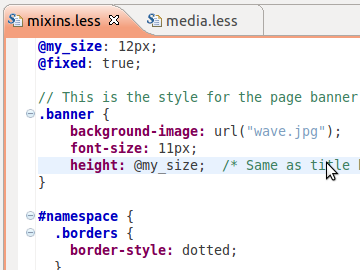
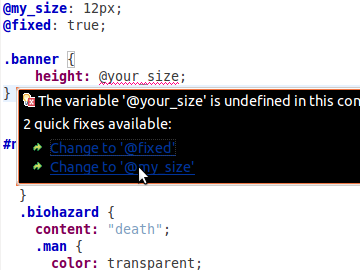
LESS is a language which extends CSS with dynamic behavior such as variables, mixins, operations and functions. This plugin extends the Eclipse IDE by providing handy features to edit and compile LESS stylesheets.
Installation
Requirements
The Eclipse LESS plugin should run on all platforms where Eclipse and LESS are supported.
Step 1: Install Base Software
In order to use the Eclipse LESS plugin, you need:
- Eclipse Kepler (version 4.3 or later). You can download it from the Eclipse website.
- The LESS compiler (if you want to compile your stylesheets in CSS), version 1.5 or further. You can download it there.
Step 2: Install the plugin
- Open again the update manager (menu Help, then Install new software...).
- In the field Work with:, enter the URL of the update
site:
http://www.normalesup.org/~simonet/soft/ow/update/ - Select the LESS plugin.
- Click on Next and validate the following messages to finalize the installation.
- During the installation, Eclipe will show a security warning. You need to acknowledge it.
- At the end of the installation, Eclipse proposes you to restart Eclipse for the installation to take effect. You should accept by clicking on Restart Now.
Note: When installing the plugin, the Eclipse installation tool will automatically install required plugins from Eclipse repository (including Xtext).
How to use it?
Once you have installed the plugin, you just need to create a
file with the file extension .less in any project.
This file will automatically be opened with the LESS editor.
You may register additional file extensions for LESS stylesheets in the Eclipse Preferences (menu Window, then Preferences...), section General > Content Types.
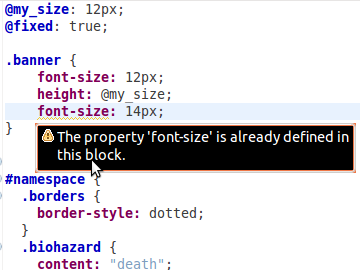
You can disable some errors/warnings on a per-project warning, by editing the project properties (tab Validation > LESS.
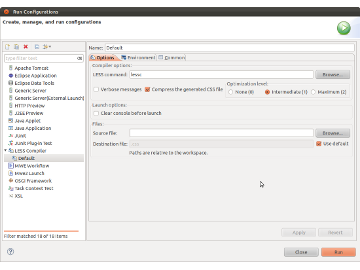
In order to launch the LESS compiler from Eclipse, you need to create a launch configuration. For this:
- In the menu Run, select Run Configurations...
- Select LESS Compiler in the list on the left hand side of the dialog, then click on the icon to create a new launch configuration at the top of this list,
- Configure the options to run the LESS compiler (in
particular the LESS command if
lesscis not in your system path) and check the option Use this launch configuration as default.
Once this is done, you may compile any LESS stylesheet by selecting it in the project explorer, clicking on the right button to open the contextual menu and selecting Run as, LESS Compiler. This will use the default launch configuration you just created. You can also create specific launch configurations for each of your stylesheet.
License
The Eclipse LESS plugin is distributed under the Eclipse Plublic License Version 1.0.
It includes some files from the Eclipse Webtools Project. These files are also distributed under the Eclipse Public License Version 1.0.
History
-
Version 1.0.22 (2014-11-01):
- Issue #240: Compatibility with Xtext 2.7.
- Version 1.0.21 (2014-06-01):
-
Version 1.0.20 (2014-05-25):
- Issue #186: Auto-edits (like insertion of quotes) can now be disabled in preferences.
- Issue #188: Fix bug in mixin validation.
- Issue #193: Numeric values in attribute selectors.
- Issue
#194:
:extendmixins. - Issue #195: Fix bug leading to comments appearing in outline.
- Issue #198: Support variables in property names.
- Issue #199: Fix bug with dashes in selector names.
- Version 1.0.19 (2014-01-26): LESS 1.5.0 support
-
Version 1.0.18 (2013-08-31):
- Issue #150: Improving content-assist for mixins.
- Issues
#151 and
#166:
Fix parsing of selector with
&. - Issue #152: Parsing of variables in pseudo-selectors.
- Issue
#155:
Allowing mixin calls in
@keyframesstatements. - Issue #159: Fixing scope of variables in parameter values.
- Issue
#160:
Allowing variables in
#selectors. - Issue #161: Enabling different colors for different types of selectors.
- Issue
#164:
Fix import of files without the
.lessfile extension as LESS stylesheets.
- Version 1.0.17 (2013-06-02):
- Version 1.0.16 (2013-04-11):
- Version 1.0.15 (2013-04-01):
-
Version 1.0.14 (2013-03-10):
- Issue #111: Make some warnings and errors configurable through project properties.
- Issue
#112:
Priorty (
!important) on mixin calls. - Issue
#113:
@importstatements with a file extension containing digits. - Issue #116: Anomymous collector mixin parameters.
- Issue #118: Variables in media queries.
- Issue
#119:
Parsing of
<in mixin guards. - Issue #120: Fixing bug in parisong of some pseudo-class arguments.
- Issue #122: Variables as pseudo-class arguments.
- Version 1.0.13 (2013-01-01):
-
Version 1.0.12 (2012-10-27):
- Issue #65: Ignore import statements with non-file URIs.
- Version 1.0.11 (2012-10-14):
-
Version 1.0.10 (2012-08-11):
- Compatibility with Eclipse 4.
-
Version 1.0.9 (2012-06-16):
- Issue #48: Syntax coloring for numeric literals (disabled by default, can be enabled in editor's preferences).
- Version 1.0.7 (2012-05-28):
-
Version 1.0.6 (2012-05-19):
- Issue #35: Make launch configurations suitable for running under Windows.
- Issue #36: Fix null pointer exception when browsing a file with unknown content-type in the launch configuration.
- Issue #38: Better syntax coloring of mixin declarations, mixin calls and variable uses.
- Issue #46: Fix error messages for undefined mixins.
- Issue #47: Allow comma-separated terms in variable definitions.
- Supporting new command-line options of the LESS compiler.
- Version 1.0.5 (2012-05-04):
-
Version 1.0.4 (2012-04-22):
- Issue #26: correct parsing of mixin parameters with several terms.
-
Version 1.0.3 (2012-04-11):
- Issue #24: Compatibility issue with Java 5.
-
Version 1.0.2 (2012-04-04):
- CSS3 selectors and media queries,
- Cross-references between files.
- Version 1.0.1 (2012-03-08):
- Version 1.0.0: First release.
Known issues
The following constructs of the LESS language are not (yet) supported:
- CSS escapes (css-escapes.less)
- Empty property values (css.less)
- Special case of the font: property
- Mixin matching based on number of arguments
The following features are not supported in the editor:
- Refactoring.